Android-Developers

  • Subscribe to our RSS feed.
  • Twitter
  • StumbleUpon
  • Reddit
  • Facebook
  • Digg

Monday, 15 October 2012

New Google Play Developer Console Available to Everyone

Posted on 10:04 by Unknown
Posted by Eva-Lotta Lamm, Riccardo Govoni, and Ellie Powers of the Google Play team


We've been working on a new Google Play Developer Console, centered around how you make and publish apps, to create a foundation for the exciting features we have planned for the future. Earlier this year at Google I/O, we demoed the new version (video). Since then, we've been testing it out with tens of thousands of developers, reviewing their feedback and making adjustments.


Today, we’re very happy to announce that all developers can now try the new Google Play Developer Console. At its core, the Developer Console is how you put your app in front of hundreds of millions of Android users around the world, and track how your app is doing. We hope that with a streamlined publishing flow, new language options, and new user ratings statistics, you’ll have better tools for delivering great Android apps that delight users.


Sleeker, faster, easier to navigate


You spend a lot of time in the Developer Console, so we overhauled the interface for you. It's bright and appealing to look at, easy to find your way around using navigation and search, and it loads quickly even if you have a lot of apps.
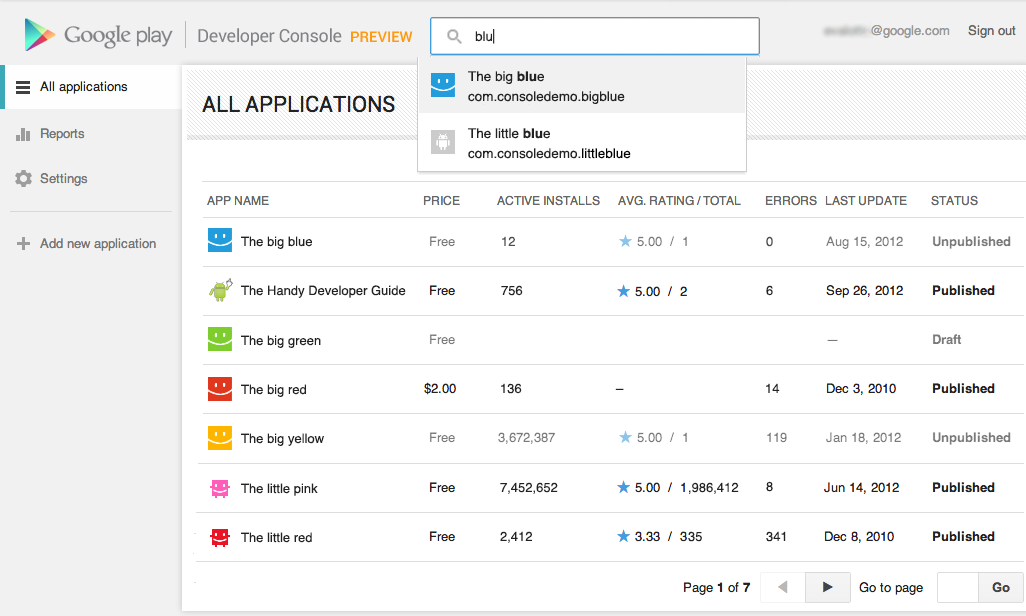


Designed for speed. Quickly locate the app data and business information you use every day. More screenshots »


Track user ratings over time, and find ways to improve


One of the most important things you'll be able to do is track the success of your app over time — it's how you continue to iterate and make beautiful, successful apps. You'll see new statistics about your user ratings: a graph showing changes over time, for both the all-time average user rating and new user ratings that come in on a certain day. As with other statistics, you'll be able to break down the data by device, country, language, carrier, Android version, and app version. For example, after optimizing your app for tablets, you could track your ratings on popular tablets.


New charts for user ratings. You can now track user ratings over time and across countries. More screenshots »


Better publishing workflow


We've completely revamped and streamlined the app publishing process to give you more time to build great apps. You can start with either an APK or an app name, and you can save before you have all of the information. You can also now see differences between the new and old versions of an app, making it easy to catch unintentional changes before you publish a new version to your users.


More languages for listings, with automated translations


You'll also enjoy a new app publishing flow and the ability to publish your app listing in 49 languages. Once you've saved any change to your application in the new Developer Console, your users will have the option of viewing an automatic translation of your listing on the web today and soon on devices — no additional action on your part is needed.


How can you try the new version?


Go to your Developer Console and click on “Try the new version” in the header or go directly to the new version. If you prefer the new version, don't forget to bookmark the new URL.


Please note that we're not quite done yet, so the following advanced features are not yet supported in the new Google Play Developer Console: multiple APK support, APK Expansion Files and announcements. To use these features, you can click “Switch back” in the header at any time to return to the old version.


Click the “Feedback” link in the header to let us know what you think, so that we can continue to improve your experience as a Google Play developer. Thank you for all of the feedback so far.


Join the discussion on

+Android Developers
Email ThisBlogThis!Share to XShare to FacebookShare to Pinterest
Posted in Developer Console, Google Play | No comments
Newer Post Older Post Home

0 comments:

Post a Comment

Subscribe to: Post Comments (Atom)

Popular Posts

  • Bring Your Apps into the Classroom, with Google Play for Education
    Posted by Shazia Makhdumi, Head of Strategic EDU Partnerships, Google Play team Google Play for Education has officially launched . It’s an ...
  • A Faster Emulator with Better Hardware Support
    [This post is by Xavier Ducrohet and Reto Meier of the Android engineering team. — Tim Bray.] The Android emulator is a key tool for Android...
  • Powering Chrome to Phone with Android Cloud to Device Messaging
    [This post is by Dave Burke, who's an Engineering Manager 80% of the time. — Tim Bray] Android Cloud to Device Messaging (C2DM) was lau...
  • Android 1.5 is here!
    I've got some good news today: the Android 1.5 SDK, release 1 is ready! Grab it from the download page . For an overview of the new Andr...
  • Memory Analysis for Android Applications
    [This post is by Patrick Dubroy, an Android engineer who writes about programming, usability, and interaction on his personal blog . — Tim B...
  • Preview of Google TV Add-on for the Android SDK
    [This post is by Ambarish Kenghe, who’s a Product Manager for Google TV — Tim Bray] At Google I/O , we announced that Android Market is comi...
  • Android SDK Tools, Revision 20
    [This post is by Xavier Ducrohet , Tech Lead for the Android developer tools] Along with the preview of the Android 4.1 (Jelly Bean) platfo...
  • RenderScript Intrinsics
    Posted by R. Jason Sams , Android RenderScript Tech Lead RenderScript has a very powerful ability called Intrinsics . Intrinsics are built-...
  • In-App Billing on Android Market: Ready for Testing
    [This post is by Eric Chu, Android Developer Ecosystem. —Dirk Dougherty] Back in January we announced our plan to introduce Android Market ...
  • Twitter for Android: A closer look at Android’s evolving UI patterns
    [This post is by Chris Nesladek, Interaction Designer, Richard Fulcher, Interaction Designer, and Virgil Dobjanschi, Software Engineer — Ti...

Categories

  • accessibility
  • Action Bar
  • Administration
  • Android
  • Android 1.5
  • Android 1.6
  • Android 2.0
  • Android 2.1
  • Android 2.2
  • Android 2.3
  • Android 2.3.3
  • Android 3.0
  • Android 3.2
  • Android 4.0
  • Android 4.2
  • Android 4.3
  • Android 4.4
  • Android Design
  • Android Developer Challenge
  • Android Developer Phone
  • Android Market
  • Android SDK
  • Android Studio
  • Animation and Graphics
  • Announcements
  • App Components
  • App Resources
  • Apps
  • Audio
  • Authentication
  • Best Practices
  • Boston
  • Code Day
  • Connectivity
  • Content Provider
  • Cool Stuff
  • Dashboard
  • Daydream
  • Debugging
  • Developer Console
  • Developer Days
  • Developer Labs
  • Developer profiles
  • Developer Story
  • Education
  • Games
  • GCM
  • Gestures
  • Google Analytics
  • Google Cloud Messaging
  • Google Cloud Platform
  • Google I/O
  • Google Play
  • Google Play game services
  • Google Play services
  • Google Services
  • Google Wallet
  • Google+
  • Guidelines
  • How-to
  • Image Processing
  • IME
  • In-app Billing
  • Input methods
  • Intents
  • io2010
  • IO2013
  • JNI
  • Layout
  • Localization
  • Location
  • Location and Sensors
  • London
  • Maps
  • Media and Camera
  • Mountain View
  • Munich
  • NDK
  • Open source
  • OpenGL ES
  • Optimization
  • Performance
  • Photo Sphere
  • Promo Graphics
  • Quality
  • Quick Search Box
  • Renderscript
  • Resources
  • RTL
  • Sample code
  • SDK Tools
  • SDK updates
  • Security
  • Sensors
  • Speech Input
  • Support Library
  • Survey
  • Tablets
  • Tel Aviv
  • Telephony
  • Testing
  • Text and Input
  • Text-to-Speech
  • Tools
  • Touch
  • User Interface
  • User Support
  • WebView
  • Widgets

Blog Archive

  • ►  2013 (45)
    • ►  November (2)
    • ►  October (7)
    • ►  September (2)
    • ►  August (5)
    • ►  July (5)
    • ►  June (4)
    • ►  May (9)
    • ►  April (3)
    • ►  March (2)
    • ►  February (3)
    • ►  January (3)
  • ▼  2012 (43)
    • ►  December (5)
    • ►  November (3)
    • ▼  October (3)
      • Google Play Seller Support in India
      • New Google Play Developer Console Available to Eve...
      • Building Quality Tablet Apps
    • ►  September (1)
    • ►  August (1)
    • ►  July (2)
    • ►  June (5)
    • ►  May (1)
    • ►  April (5)
    • ►  March (6)
    • ►  February (5)
    • ►  January (6)
  • ►  2011 (67)
    • ►  December (7)
    • ►  November (7)
    • ►  October (5)
    • ►  September (5)
    • ►  August (3)
    • ►  July (7)
    • ►  June (3)
    • ►  May (5)
    • ►  April (6)
    • ►  March (8)
    • ►  February (7)
    • ►  January (4)
  • ►  2010 (72)
    • ►  December (8)
    • ►  November (3)
    • ►  October (4)
    • ►  September (8)
    • ►  August (6)
    • ►  July (9)
    • ►  June (11)
    • ►  May (11)
    • ►  April (2)
    • ►  March (3)
    • ►  February (2)
    • ►  January (5)
  • ►  2009 (63)
    • ►  December (7)
    • ►  November (5)
    • ►  October (5)
    • ►  September (8)
    • ►  August (2)
    • ►  July (1)
    • ►  June (2)
    • ►  May (5)
    • ►  April (12)
    • ►  March (5)
    • ►  February (8)
    • ►  January (3)
  • ►  2008 (40)
    • ►  December (3)
    • ►  November (1)
    • ►  October (4)
    • ►  September (6)
    • ►  August (4)
    • ►  June (1)
    • ►  May (5)
    • ►  April (4)
    • ►  March (5)
    • ►  February (2)
    • ►  January (5)
  • ►  2007 (8)
    • ►  December (3)
    • ►  November (5)
Powered by Blogger.

About Me

Unknown
View my complete profile