Android-Developers

  • Subscribe to our RSS feed.
  • Twitter
  • StumbleUpon
  • Reddit
  • Facebook
  • Digg

Wednesday, 13 November 2013

Bring Your Apps into the Classroom, with Google Play for Education

Posted on 04:05 by Unknown

Posted by Shazia Makhdumi, Head of Strategic EDU Partnerships, Google Play team


Google Play for Education has officially launched. It’s an extension of Google Play that’s designed for schools, simplifying discovery of educational apps and enabling developers and content providers to reach K-12 educators in the U.S. It offers bulk purchasing with purchase orders and instant distribution of educational apps, videos and other educational content to students' Android tablets via the cloud. Google Play for Education helps your apps gain visibility with the right audiences, without having to knock on school doors.
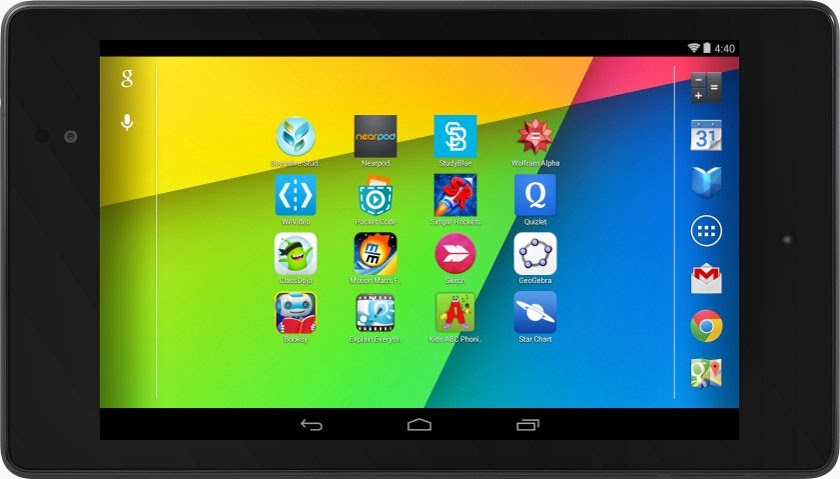


If you've built an Android app that would be awesome for schools—or even have an idea for one—now's the time to jump in. We'll put you one click away from getting purchased and installed by entire school districts. Class Dojo, Explain Everything, Nearpod, and Socrative are already getting discovered in Google Play for Education.


How to join Google Play for Education


If you already have an educational Android app you can use the Google Play Developer Console to mark your apps for inclusion in Google Play for Education. Marking your app identifies it as suitable for the US K-12 educational market and queues it for educator approval. These educators perform a first-pass qualification of apps, assigning the appropriate subject, grade, and common core standards metadata, while evaluating if the app meets the Google Play for Education criteria for classroom use.


Designing great apps for classrooms


High quality apps are top priority for teachers. Whether you already have an existing K-12 educational app or are looking to build one, take a look at our detailed requirements and guidelines—which we have compiled for you based on educator feedback—to ensure your app is appropriate for a K-12 environment. Also ensure that your app is optimized for both 7” and 10” Android tablets. Then, upload your new or updated app through the Developer Console, opt in to Google Play for Education, and publish. We will email you when your app has been evaluated.


For more information, please visit the Google Play for Education pages on the Android developer site. We are excited to be supporting schools to bring the best content and tools to their students. We look forward to seeing your app on Google Play for Education.





Join the discussion on


+Android Developers


Read More
Posted in Education, Google Play, Tablets | No comments

Monday, 11 November 2013

App Translation Service Now Available to All Developers

Posted on 10:19 by Unknown

Posted by Ellie Powers, Google Play team


Today we are happy to announce that the App Translation Service, previewed in May at Google I/O, is now available to all developers. Every day, more than 1.5 million new Android phones and tablets around the world are turned on for the first time. Each newly activated Android device is an opportunity for you as a developer to gain a new user, but frequently, that user speaks a different language from you.


To help developers reach users in other languages, we launched the App Translation Service, which allows developers to purchase professional app translations through the Google Play Developer Console. This is part of a toolbox of localization features you can (and should!) take advantage of as you distribute your app around the world through Google Play.


We were happy to see that many developers expressed interest in the App Translation Service pilot program, and it has been well received by those who have participated so far, with many repeat customers.


Here are several examples from developers who participated in the App Translation Service pilot program: the developers of Zombie Ragdoll used this tool to launch their new game simultaneously in 20 languages in August 2013. When they combined app translation with local marketing campaigns, they found that 80% of their installs came from non-English-language users. Dating app SayHi Chat expanded into 13 additional languages using the App Translation Service. They saw 120% install growth in localized markets and improved user reviews of the professionally translated UI. The developer of card game G4A Indian Rummy found that the App Translation Service was easier to use than their previous translation methods, and saw a 300% increase with user engagement in localized apps. You can read more about these developers’ experiences with the App Translation Service in Developer Stories: Localization in Google Play.


To use the App Translation Service, you’ll want to first read the localization checklist. You’ll need to get your APK ready for translation, and select the languages to target for translation. If you’re unsure about which languages to select, Google Play can help you identify opportunities. First, review the Statistics section in the Developer Console to see where your app has users already. Does your app have a lot of installs in a certain country where you haven’t localized to their language? Are apps like yours popular in a country where your app isn’t available yet? Next, go to the Optimization Tips section in the Developer Console to make sure your APK, store listing, and graphics are consistently translated.


You’ll find the App Translation Service in the Developer Console at the bottom of the APK section — you can start a new translation or manage an existing translation here. You’ll be able to upload your app’s file of string resources, select the languages you want to translate into, select a professional translation vendor, and place your order. Pro tip: you can put your store listing text into the file you upload to the App Translation Service. You’ll be able to communicate with your translator to be sure you get a great result, and download your translated string files. After you do some localization testing, you’ll be ready to publish your newly translated app update on Google Play — with localized store listing text and graphics. Be sure to check back to see the results on your user base, and track the results of marketing campaigns in your new languages using Google Analytics integration.


Good luck! Bonne chance ! ご幸運を祈ります! 행운을 빌어요 ¡Buena suerte! Удачи! Boa Sorte!


Join the discussion on


+Android Developers
Read More
Posted in Developer Console, Google Play, Localization | No comments

Thursday, 31 October 2013

Android 4.4 KitKat and Updated Developer Tools

Posted on 11:12 by Unknown
Posted by Dave Burke, Engineering Director, Android Platform


Today we are announcing Android 4.4 KitKat, a new version of Android that brings great new features for users and developers.


The very first device to run Android 4.4 is the new Nexus 5, available today on Google Play, and coming soon to other retail outlets. We’ll also be rolling out the Android 4.4 update worldwide in the next few weeks to all Nexus 4, Nexus 7, and Nexus 10 devices, as well as the Samsung Galaxy S4 and HTC One Google Play Edition devices.


As part of this release, we kicked off Project Svelte, an effort to reduce the memory needs of Android so that it can run on a much broader range of devices, including entry-level devices that have as little as 512MB RAM. From the kernel to system, frameworks, and apps, we've reduced memory footprint and improved memory management so Android can run comfortably on only 512MB of RAM. We did this not only on Android but across Google apps, like Chrome and YouTube.


By supporting a broader range of devices, Android 4.4 will help move the Android ecosystem forward. Now all users will be able to enjoy the very best that Android has to offer, on the devices that best meet their needs.


Here’s a quick look at some of the new features for developers:


  • New ways to create beautiful apps — A new full-screen immersive mode lets your app or game use every pixel on the screen to showcase content and capture touch events. A new transitions framework makes it easier to animate the states in your UI. Web content can take advantage of a completely new implementation of WebView built on Chromium.


  • More useful than ever — A printing framework lets you add the convenience of printing to your apps. A storage access framework makes it easier for users find documents, photos, and other data across their local and cloud-based storage services. You can integrate your app or storage service with the framework to give users instant access to their data.


  • Low-power sensors — New hardware-integrated sensors let you add great new features to your apps without draining the battery. Included are a step detector and step counter that let you efficiently track of the number of walking steps, even when the screen is off.


  • New media capabilities — A new screen recorder lets you capture high-quality video of your app directly from your Android device. It's a great new way to create walkthroughs, tutorials, marketing videos, and more. Apps can use adaptive playback to offer a significantly better streaming video experience.


  • RenderScript in the NDK — A new C++ API in the Android Native Development Kit (NDK) lets you use RenderScript from your native code, with access to script intrinsics, custom kernels, and more.


  • Improved accessibility support — New system-wide captioning settings let your apps present closed captions in the style that's preferred by the user.


There's a lot more, so be sure to check out the Android 4.4 platform highlights for a complete overview of those and other new capabilities for developers. For details on the APIs and how to use them, take a look at the API Overview or watch one of the new DevBytes videos on KitKat.


Along with the new Android 4.4 platform we're releasing a new version of the Android NDK (r9b). The new NDK gives you native access to RenderScript and other stable APIs in Android 4.4, so if you've been waiting to use RenderScript from your native code, give it a try.


Last, we've updated the Support Package (r19) with a new helper library for printing images through the new printing framework, as well as other updates.


You can get started developing and testing on Android 4.4 right away, in Android Studio or in ADT/Ant. You can download the Android 4.4 Platform (API level 19), as well as the SDK Tools, Platform Tools, and Support Package from the Android SDK Manager.


Join the discussion on


+Android Developers
Read More
Posted in Android 4.4 | No comments

Google Play Services 4.0

Posted on 11:07 by Unknown

Today we're launching a new release of Google Play services. Version 4.0 includes the Google Mobile Ads SDK, and offers improvements to geofencing, Google+, and Google Wallet Instant Buy APIs.


With over 97% of devices now running Android 2.3 (Gingerbread) or newer platform versions, we’re dropping support for Froyo from this release of the Google Play services SDK in order to make it possible to offer more powerful APIs in the future. That means you will not be able to utilize these new APIs on devices running Android 2.2 (Froyo).


We’re still in the process of rolling out to Android devices across the world, but you can already download the latest Google Play services SDK and start developing against the new APIs using the new Android 4.4 (KitKat) emulator.


Google Mobile Ads


If you’re using AdMob to monetize your apps, the new Google Mobile Ads SDK in Google Play services helps provide seamless improvements to your users. For example, bug fixes get pushed automatically to users without you having to do anything. Check out the post on the Google Ads Developer Blog for more details.


Maps and Location Based Services


The Maps and Geofencing APIs that launched in Google Play services 3.1 have been updated to improve overall battery efficiency and responsiveness.


You can save power by requesting larger latency values for notifications alerting your app to users entering or exiting geofences, or request that entry alerts are sent only after a user stays within a geofence for a specified period of time. Setting generous dwell times helps to eliminate unwanted notifications when a user passes near a geofence or their location is seen to move across a boundary.


The Maps API enhances map customization features, letting you specify marker opacity, fade-in effects, and visibility of 3D buildings. It’s also now possible to change ground overlay images.


Google+ and Google Wallet Instant Buy


Apps that are enabled with Google+ Sign-In will be updated with a simplified sign-in consent dialog. Google Wallet Instant Buy APIs are now available to everyone to try out within a sandbox, with a simplified API that streamlines the buy-flow and reduces integration time.


Google Wallet Instant Buy also includes new Wallet Objects, which means you can award loyalty points to a user's saved rewards program ID for each applicable Google Wallet Instant Buy purchase.


New user control over advertising identifier


To give users better controls and to provide you with a simple, standard system to continue to monetize your apps, this update contains a new, anonymous identifier for advertising purposes (to be used in place of Android ID). Google Settings now includes user controls that enable users to reset this identifier, or opt out of interest-based ads for Google Play apps.


More About Google Play Services


To learn more about Google Play services and the APIs available to you through it, visit the Google Services area of the Android Developers site.


Join the discussion on


+Android Developers
Read More
Posted in Google Play services | No comments

Making your App Content more Accessible from Google

Posted on 11:04 by Unknown

Posted by Chaesang Jung, Software Engineer


There are many reasons to build or not to build a mobile app as part of your broader mobile strategy. For instance, while apps offer a rich user experience, users can’t access them through Google Search like they do websites. Today, we’re announcing a new Google Search capability, app indexing, that will start to make apps more accessible through Google on Android.


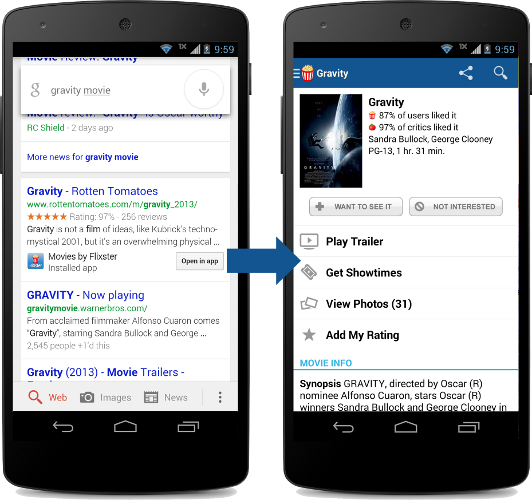
Let’s say that a user is searching for a movie. With app indexing, Google will begin to include deep links to apps in Android search results. When the user taps on the “Open in app” deep links, the app opens up directly to the movie in question.


In this example, in order for the app deep links to appear in search results,


  • The Flixster app supports deep linking

  • The Rotten Tomatoes website has specified that the Flixster app page is an alternate for the web page

  • Google has indexed the Flixster app to determine relevance

  • The user has installed the Flixster app


The end result is that users will have a seamless search experience when accessing your app content through Google.


Google is currently testing app indexing with an initial group of developers including AllTheCooks, AllTrails, Beautylish, Etsy, Expedia, Flixster, Healthtap, IMDb, moviefone, newegg, OpenTable, Trulia, and Wikipedia. Deep links for these applications will start to appear in Google search results on Android, in the US, in a few weeks.


How to get started


If you are interested in enabling indexing for your Android app, you can learn more about our developer guidelines at developers.google.com/app-indexing and sign up. We are expanding our app indexing efforts and will gradually include more developers over time.


Read More
Posted in | No comments

Monday, 14 October 2013

Getting Your SMS Apps Ready for KitKat

Posted on 14:13 by Unknown


Posted by Scott Main and David Braun


Sending and receiving SMS messages are fundamental features on mobile devices and many developers have built successful apps that enhance this experience on Android. Some of you have built SMS apps using hidden APIs—a practice we discourage because hidden APIs may be changed or removed and new devices are not tested against them for compatibility. So, to provide you with a fully supported set of APIs for building SMS apps and to make the user experience for messaging more predictable, Android 4.4 (KitKat) makes the existing APIs public and adds the concept of a default SMS app, which the user can select in system settings.


This means that if you are using the hidden SMS APIs on previous platform versions,
you need to make some adjustments so your app continues to work when Android 4.4 is released later this year.


Make your app the default SMS app


On Android 4.4, only one app can receive the new SMS_DELIVER_ACTION intent, which the system
broadcasts when a new SMS message arrives. Which app receives this broadcast is determined by
which app the user has selected as the default SMS app in system settings. Likewise, only the
default SMS app receives the new WAP_PUSH_DELIVER_ACTION intent when a new MMS arrives.


Other apps that only want to read new messages can instead receive the SMS_RECEIVED_ACTION broadcast intent when a new SMS arrives. However, only the app that receives the SMS_DELIVER_ACTION broadcast (the user-specified default SMS app) is able to write to the SMS Provider defined by the android.provider.Telephony class and subclasses. As such, it's important that you update your messaging app as soon as possible to be available as a default SMS app, because although your existing app won't crash on an Android 4.4 device, it will silently fail when attempting to write to the SMS Provider.


In order for your app to appear in the system settings as an eligible default SMS app, your manifest file must declare some specific capabilities. So you must update your app to do the following things:


  • In a broadcast receiver, include an intent filter for SMS_DELIVER_ACTION ("android.provider.Telephony.SMS_DELIVER"). The broadcast receiver must also require the BROADCAST_SMS permission.

    This allows your app to directly receive incoming SMS messages.


  • In a broadcast receiver, include an intent filter for WAP_PUSH_DELIVER_ACTION ("android.provider.Telephony.WAP_PUSH_DELIVER") with the MIME type "application/vnd.wap.mms-message". The broadcast receiver must also require the BROADCAST_WAP_PUSH permission.

    This allows your app to directly receive incoming MMS messages.


  • In your activity that delivers new messages, include an intent filter for ACTION_SENDTO ("android.intent.action.SENDTO") with schemas, sms:, smsto:, mms:, and mmsto:.

    This allows your app to receive intents from other apps that want to deliver a message.


  • In a service, include an intent filter for ACTION_RESPONSE_VIA_MESSAGE ("android.intent.action.RESPOND_VIA_MESSAGE") with schemas, sms:, smsto:, mms:, and mmsto:. This service must also require the SEND_RESPOND_VIA_MESSAGE permission.

    This allows users to respond to incoming phone calls with an immediate text message using your app.


For example, here's a manifest file with the necessary components and intent filters:


<manifest>
...
<application>
<!-- BroadcastReceiver that listens for incoming SMS messages -->
<receiver android:name=".SmsReceiver"
android:permission="android.permission.BROADCAST_SMS">
<intent-filter>
<action android:name="android.provider.Telephony.SMS_DELIVER" />
</intent-filter>
</receiver>

<!-- BroadcastReceiver that listens for incoming MMS messages -->
<receiver android:name=".MmsReceiver"
android:permission="android.permission.BROADCAST_WAP_PUSH">
<intent-filter>
<action android:name="android.provider.Telephony.WAP_PUSH_DELIVER" />
<data android:mimeType="application/vnd.wap.mms-message" />
</intent-filter>
</receiver>

<!-- Activity that allows the user to send new SMS/MMS messages -->
<activity android:name=".ComposeSmsActivity" >
<intent-filter>
<action android:name="android.intent.action.SEND" />
<action android:name="android.intent.action.SENDTO" />
<category android:name="android.intent.category.DEFAULT" />
<category android:name="android.intent.category.BROWSABLE" />
<data android:scheme="sms" />
<data android:scheme="smsto" />
<data android:scheme="mms" />
<data android:scheme="mmsto" />
</intent-filter>
</activity>

<!-- Service that delivers messages from the phone "quick response" -->
<service android:name=".HeadlessSmsSendService"
android:permission="android.permission.SEND_RESPOND_VIA_MESSAGE"
android:exported="true" >
<intent-filter>
<action android:name="android.intent.action.RESPOND_VIA_MESSAGE" />
<category android:name="android.intent.category.DEFAULT" />
<data android:scheme="sms" />
<data android:scheme="smsto" />
<data android:scheme="mms" />
<data android:scheme="mmsto" />
</intent-filter>
</service>
</application>
</manifest>


Any filters for the SMS_RECEIVED_ACTION broadcast in existing apps will continue to work the same on Android 4.4, but only as an observer of new messages, because unless your app also receives the SMS_DELIVER_ACTION broadcast, you cannot write to the SMS Provider on Android 4.4.


Beginning with Android 4.4, you should stop listening for the SMS_RECEIVED_ACTION broadcast, which you can do at runtime by checking the platform version then disabling your broadcast receiver for SMS_RECEIVED_ACTION with PackageManager.setComponentEnabledSetting(). However, you can continue listening for that broadcast if your app needs only to read special SMS messages, such as to perform phone number verification. Note that—beginning with Android 4.4—any attempt by your app to abort the SMS_RECEIVED_ACTION broadcast will be ignored so all apps interested have the chance to receive it.


Tip: To distinguish the two SMS broadcasts, imagine that the SMS_RECEIVED_ACTION simply says "the system received an SMS," whereas the SMS_DELIVER_ACTION says "the system is delivering your app an SMS, because you're the default SMS app."


Disable features when not the default SMS app


In consideration of some apps that do not want to behave as the default SMS app but still want to send messages, any app that has the SEND_SMS permission is still able to send SMS messages using SmsManager. If and only if an app is not selected as the default SMS app on Android 4.4, the system automatically writes the sent SMS messages to the SMS Provider (the default SMS app is always responsible for writing its sent messages to the SMS Provider).


However, if your app is designed to behave as the default SMS app, then while your app is not selected as the default, it's important that you understand the limitations placed upon your app and disable features as appropriate. Although the system writes sent SMS messages to the SMS Provider while your app is not the default SMS app, it does not write sent MMS messages and your app is not able to write to the SMS Provider for other operations, such as to mark messages as draft, mark them as read, delete them, etc.


So when your messaging activity resumes, check whether your app is the default SMS app by querying Telephony.Sms.getDefaultSmsPackage(), which returns the package name of the current default SMS app. If it doesn't match your package name, disable features such as the ability for users to send new messages.


When the user decides to use your app for messaging, you can display a dialog hosted by the system that allows the user to make your app the default SMS app. To display the dialog, call startActivity() with the Telephony.Sms.Intents.ACTION_CHANGE_DEFAULT intent, including an extra with the Sms.Intents.EXTRA_PACKAGE_NAME key and your package name as the string value.


For example, your activity might include code like this:


public class ComposeSmsActivity extends Activity {

@Override
protected void onResume() {
super.onResume();

final String myPackageName = getPackageName();
if (!Telephony.Sms.getDefaultSmsPackage(this).equals(myPackageName)) {
// App is not default.
// Show the "not currently set as the default SMS app" interface
View viewGroup = findViewById(R.id.not_default_app);
viewGroup.setVisibility(View.VISIBLE);

// Set up a button that allows the user to change the default SMS app
Button button = (Button) findViewById(R.id.change_default_app);
button.setOnClickListener(new View.OnClickListener() {
public void onClick(View v) {
Intent intent =
new Intent(Telephony.Sms.Intents.ACTION_CHANGE_DEFAULT);
intent.putExtra(Telephony.Sms.Intents.EXTRA_PACKAGE_NAME,
myPackageName);
startActivity(intent);
}
});
} else {
// App is the default.
// Hide the "not currently set as the default SMS app" interface
View viewGroup = findViewById(R.id.not_default_app);
viewGroup.setVisibility(View.GONE);
}
}
}


Advice for SMS backup & restore apps


Because the ability to write to the SMS Provider is restricted to the app the user selects as the default SMS app, any existing app designed purely to backup and restore SMS messages will currently be unable to restore SMS messages on Android 4.4. An app that backs up and restores SMS messages must also be set as the default SMS app so that it can write messages in the SMS Provider. However, if the app does not also send and receive SMS messages, then it should not remain set as the default SMS app. So, you can provide a functional user experience with the following design when the user opens your app to initiate a one-time restore operation:


  1. Query the current default SMS app's package name and save it.
    String defaultSmsApp = Telephony.Sms.getDefaultSmsPackage(context);


  2. Request the user change the default SMS app to your app in order to restore SMS messages (you must be the default SMS app in order to write to the SMS Provider).
    Intent intent = new Intent(context, Sms.Intents.ACTION_CHANGE_DEFAULT);
    intent.putExtra(Sms.Intents.EXTRA_PACKAGE_NAME, context.getPackageName());
    startActivity(intent);


  3. When you finish restoring all SMS messages, request the user to change the default SMS app back to the previously selected app (saved during step 1).
    Intent intent = new Intent(context, Sms.Intents.ACTION_CHANGE_DEFAULT);
    intent.putExtra(Sms.Intents.EXTRA_PACKAGE_NAME, defaultSmsApp);
    startActivity(intent);


Prepare to update your SMS app


We encourage you to update your apps as soon as possible to provide your users the best experience on Android. To help you make the changes, we'll soon be providing the necessary SDK components for Android 4.4 that allow you to compile and test your changes on Android 4.4. Stay tuned!

Read More
Posted in | No comments

Friday, 11 October 2013

Tablet changes in Google Play coming up November 21

Posted on 09:56 by Unknown

Posted by Ellie Powers, Google Play team


Fueled by the Nexus 7 and other great devices, more than 70 million Android tablets have been activated. Thousands of developers have already designed their apps to look great on tablets, and with the holidays fast approaching, we’re making it even easier for the next wave of tablet owners to discover great apps and games.


Play Store tablet changes coming up on November 21


Earlier this year, Google Play added a “designed for tablets” section, where users could easily discover apps that look great on their 7”- and 10”-tablets. This section includes only apps and games which meet criteria and guidelines we established last year. (Here’s an overview if you missed it.) Developers who invest the time to meet the criteria are seeing great results; take Remember The Milk, which saw an 83% increase in tablet downloads from being in this section. (see the whole story here).


On November 21, the Play Store will make a series of changes so it’s even easier for tablet users to find those apps that are best for their devices. First, by default, users browsing Google Play on a tablet will now see apps and games that are designed for tablets on the top lists (Top Paid, Top Free, Top Grossing, Top New Paid, Top New Free, and Trending). Tablet users will still be able to switch the view so they can see all apps or games if they choose. Also starting November 21, apps and games that do not meet the “designed for tablets” criteria will be marked as “designed for phones” for users who browse the Play Store on tablets.


You’ll want to make sure that your app is designed for tablets; read more about how to do this at the end of this blog post.


Make sure your app is ready!


If you want to be sure your app is included in the “Designed for tablets” view in time for the November 21 Play Store changes, go to the Developer Console to check your tablet optimization tips. If you see any issues listed there, you’ll need to address them in your app and upload a new binary for distribution. If there are no issues listed, your app is eligible to be included in the “Designed for tablets" view in the top lists.


Also, make sure to read the full tablet quality checklist to understand how to build outstanding tablet experiences.


Everyday, thousands of Android developers are taking advantage of the tremendous Android tablet opportunity. The flood of new users coupled with the increased screen size means new user experiences, more engagement and more monetization opportunities. We’re excited to see what you do!


Join the discussion on


+Android Developers
Read More
Posted in Google Play, Tablets | No comments
Older Posts Home
Subscribe to: Comments (Atom)

Popular Posts

  • Bring Your Apps into the Classroom, with Google Play for Education
    Posted by Shazia Makhdumi, Head of Strategic EDU Partnerships, Google Play team Google Play for Education has officially launched . It’s an ...
  • A Faster Emulator with Better Hardware Support
    [This post is by Xavier Ducrohet and Reto Meier of the Android engineering team. — Tim Bray.] The Android emulator is a key tool for Android...
  • Powering Chrome to Phone with Android Cloud to Device Messaging
    [This post is by Dave Burke, who's an Engineering Manager 80% of the time. — Tim Bray] Android Cloud to Device Messaging (C2DM) was lau...
  • Android 1.5 is here!
    I've got some good news today: the Android 1.5 SDK, release 1 is ready! Grab it from the download page . For an overview of the new Andr...
  • Memory Analysis for Android Applications
    [This post is by Patrick Dubroy, an Android engineer who writes about programming, usability, and interaction on his personal blog . — Tim B...
  • Preview of Google TV Add-on for the Android SDK
    [This post is by Ambarish Kenghe, who’s a Product Manager for Google TV — Tim Bray] At Google I/O , we announced that Android Market is comi...
  • Android SDK Tools, Revision 20
    [This post is by Xavier Ducrohet , Tech Lead for the Android developer tools] Along with the preview of the Android 4.1 (Jelly Bean) platfo...
  • RenderScript Intrinsics
    Posted by R. Jason Sams , Android RenderScript Tech Lead RenderScript has a very powerful ability called Intrinsics . Intrinsics are built-...
  • In-App Billing on Android Market: Ready for Testing
    [This post is by Eric Chu, Android Developer Ecosystem. —Dirk Dougherty] Back in January we announced our plan to introduce Android Market ...
  • Twitter for Android: A closer look at Android’s evolving UI patterns
    [This post is by Chris Nesladek, Interaction Designer, Richard Fulcher, Interaction Designer, and Virgil Dobjanschi, Software Engineer — Ti...

Categories

  • accessibility
  • Action Bar
  • Administration
  • Android
  • Android 1.5
  • Android 1.6
  • Android 2.0
  • Android 2.1
  • Android 2.2
  • Android 2.3
  • Android 2.3.3
  • Android 3.0
  • Android 3.2
  • Android 4.0
  • Android 4.2
  • Android 4.3
  • Android 4.4
  • Android Design
  • Android Developer Challenge
  • Android Developer Phone
  • Android Market
  • Android SDK
  • Android Studio
  • Animation and Graphics
  • Announcements
  • App Components
  • App Resources
  • Apps
  • Audio
  • Authentication
  • Best Practices
  • Boston
  • Code Day
  • Connectivity
  • Content Provider
  • Cool Stuff
  • Dashboard
  • Daydream
  • Debugging
  • Developer Console
  • Developer Days
  • Developer Labs
  • Developer profiles
  • Developer Story
  • Education
  • Games
  • GCM
  • Gestures
  • Google Analytics
  • Google Cloud Messaging
  • Google Cloud Platform
  • Google I/O
  • Google Play
  • Google Play game services
  • Google Play services
  • Google Services
  • Google Wallet
  • Google+
  • Guidelines
  • How-to
  • Image Processing
  • IME
  • In-app Billing
  • Input methods
  • Intents
  • io2010
  • IO2013
  • JNI
  • Layout
  • Localization
  • Location
  • Location and Sensors
  • London
  • Maps
  • Media and Camera
  • Mountain View
  • Munich
  • NDK
  • Open source
  • OpenGL ES
  • Optimization
  • Performance
  • Photo Sphere
  • Promo Graphics
  • Quality
  • Quick Search Box
  • Renderscript
  • Resources
  • RTL
  • Sample code
  • SDK Tools
  • SDK updates
  • Security
  • Sensors
  • Speech Input
  • Support Library
  • Survey
  • Tablets
  • Tel Aviv
  • Telephony
  • Testing
  • Text and Input
  • Text-to-Speech
  • Tools
  • Touch
  • User Interface
  • User Support
  • WebView
  • Widgets

Blog Archive

  • ▼  2013 (45)
    • ▼  November (2)
      • Bring Your Apps into the Classroom, with Google Pl...
      • App Translation Service Now Available to All Devel...
    • ►  October (7)
    • ►  September (2)
    • ►  August (5)
    • ►  July (5)
    • ►  June (4)
    • ►  May (9)
    • ►  April (3)
    • ►  March (2)
    • ►  February (3)
    • ►  January (3)
  • ►  2012 (43)
    • ►  December (5)
    • ►  November (3)
    • ►  October (3)
    • ►  September (1)
    • ►  August (1)
    • ►  July (2)
    • ►  June (5)
    • ►  May (1)
    • ►  April (5)
    • ►  March (6)
    • ►  February (5)
    • ►  January (6)
  • ►  2011 (67)
    • ►  December (7)
    • ►  November (7)
    • ►  October (5)
    • ►  September (5)
    • ►  August (3)
    • ►  July (7)
    • ►  June (3)
    • ►  May (5)
    • ►  April (6)
    • ►  March (8)
    • ►  February (7)
    • ►  January (4)
  • ►  2010 (72)
    • ►  December (8)
    • ►  November (3)
    • ►  October (4)
    • ►  September (8)
    • ►  August (6)
    • ►  July (9)
    • ►  June (11)
    • ►  May (11)
    • ►  April (2)
    • ►  March (3)
    • ►  February (2)
    • ►  January (5)
  • ►  2009 (63)
    • ►  December (7)
    • ►  November (5)
    • ►  October (5)
    • ►  September (8)
    • ►  August (2)
    • ►  July (1)
    • ►  June (2)
    • ►  May (5)
    • ►  April (12)
    • ►  March (5)
    • ►  February (8)
    • ►  January (3)
  • ►  2008 (40)
    • ►  December (3)
    • ►  November (1)
    • ►  October (4)
    • ►  September (6)
    • ►  August (4)
    • ►  June (1)
    • ►  May (5)
    • ►  April (4)
    • ►  March (5)
    • ►  February (2)
    • ►  January (5)
  • ►  2007 (8)
    • ►  December (3)
    • ►  November (5)
Powered by Blogger.

About Me

Unknown
View my complete profile