Android-Developers

  • Subscribe to our RSS feed.
  • Twitter
  • StumbleUpon
  • Reddit
  • Facebook
  • Digg

Monday, 3 June 2013

Bootstrap Your App's Cloud Services with Mobile Backend Starter

Posted on 10:14 by Unknown
Posted by Brad Abrams, Product Manager, Google Cloud Platform

Many of the best mobile app experiences are powered by services in the cloud. Top Android developers such as Pulse and SongPop have long taken advantage of the convenience and scalability of Google's cloud platform in their businesses. Now with the Mobile Backend Starter, it's even easier to add cloud services to your apps.


Mobile Backend Starter


Mobile Backend Starter is a one-click deployable, complete mobile backend that allows you to reap the benefits of a cloud backend with none of the headaches. It provides a ready-to-deploy, general purpose cloud backend and a general purpose client-side framework for Android.


Mobile Backend Starter gives you everything you need to rapidly set up a backend for your app, without needing to write any backend code. It includes a server that stores your data with App Engine and a client library and sample app for Android that make it easy to access that data. You can also add support for Google Cloud Messaging (GCM) and continuous queries that notify your app of events you are interested in. To keep user data secure, Mobile Backend Starter also includes built-in support for Google Authentication.
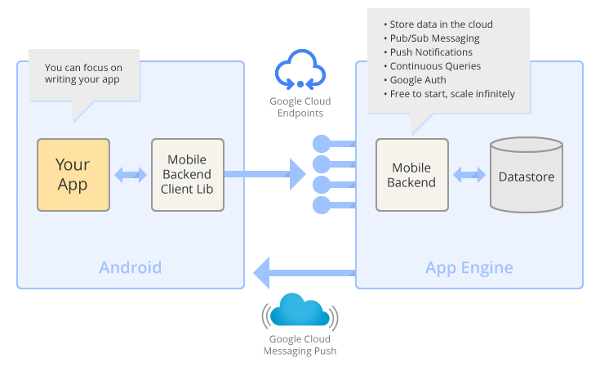


Features of Mobile Backend Starter include:


  • Cloud data storage: Users change devices and increasingly use multiple devices. Store any amount of data per user in the cloud to be accessed from anywhere.

  • Pub/Sub messaging: Send messages from one device, to any or all other devices. You can easily use 1:1 and 1:many messaging as well as broadcasting. This feature is useful for various applications including social apps, forums, chat, gaming, and group collaborations.

  • Push notifications: Data updated on one device is automatically available on all devices with GCM for Android.

  • Continuous queries: Create queries that run continuously on the server, automatically feeding updates to the client. These queries are powered by Prospective Search.

  • Google authentication and authorization: Keep data isolated per user or shared among users.

  • Free to get started, scales with your needs: You can start by handling hundreds of users for free, then grow to any scale.


Quick setup and integration


You can set up and run the Mobile Backend Starter in just few steps:


  1. First, go to the Google Cloud Console, and create a project. Then click Deploy.

  2. Click on Settings to go to the admin control panel for your new backend. Under Authentication / Authorization, select "Open (for development use only)" and save the changes.
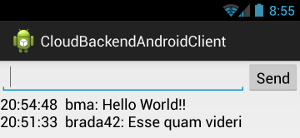


  3. Next, download the Android client project and open it up in your Android IDE. Locate the Consts.java file and set the PROJECT_ID to the Project ID of the project you created in the Google Cloud Console.

  4. Now just build and run the Android application and you have a cloud enabled Android application.


Check out the complete docs for details on setup as well as information on how to enable authentication, send push notifications, and use standing queries.


The best part is you can download the complete source code of the backend on GitHub and customize it however you want to meet your needs.


See Mobile Backend Starter in action at Google I/O


To see Mobile Backend Starter in action, check out our talk at Google I/O 2013 (embedded below) called "From Nothing to Nirvana in Minutes: Cloud Backend for Your Android Application". The talk shows how to use Mobile Backend Starter to create a new backend server and integrate it with an Android app via Google Cloud Endpoints and the Google Plugin for Eclipse.


We look forward to hearing your questions and learning about the amazing applications you have built. You can find us lurking on the Cloud Endpoints StackOverflow forum.


Join the discussion on


+Android Developers

Email ThisBlogThis!Share to XShare to FacebookShare to Pinterest
Posted in Google Cloud Messaging, Google Cloud Platform | No comments
Newer Post Older Post Home

0 comments:

Post a Comment

Subscribe to: Post Comments (Atom)

Popular Posts

  • Bring Your Apps into the Classroom, with Google Play for Education
    Posted by Shazia Makhdumi, Head of Strategic EDU Partnerships, Google Play team Google Play for Education has officially launched . It’s an ...
  • A Faster Emulator with Better Hardware Support
    [This post is by Xavier Ducrohet and Reto Meier of the Android engineering team. — Tim Bray.] The Android emulator is a key tool for Android...
  • Powering Chrome to Phone with Android Cloud to Device Messaging
    [This post is by Dave Burke, who's an Engineering Manager 80% of the time. — Tim Bray] Android Cloud to Device Messaging (C2DM) was lau...
  • Android 1.5 is here!
    I've got some good news today: the Android 1.5 SDK, release 1 is ready! Grab it from the download page . For an overview of the new Andr...
  • Memory Analysis for Android Applications
    [This post is by Patrick Dubroy, an Android engineer who writes about programming, usability, and interaction on his personal blog . — Tim B...
  • Preview of Google TV Add-on for the Android SDK
    [This post is by Ambarish Kenghe, who’s a Product Manager for Google TV — Tim Bray] At Google I/O , we announced that Android Market is comi...
  • Android SDK Tools, Revision 20
    [This post is by Xavier Ducrohet , Tech Lead for the Android developer tools] Along with the preview of the Android 4.1 (Jelly Bean) platfo...
  • RenderScript Intrinsics
    Posted by R. Jason Sams , Android RenderScript Tech Lead RenderScript has a very powerful ability called Intrinsics . Intrinsics are built-...
  • In-App Billing on Android Market: Ready for Testing
    [This post is by Eric Chu, Android Developer Ecosystem. —Dirk Dougherty] Back in January we announced our plan to introduce Android Market ...
  • Twitter for Android: A closer look at Android’s evolving UI patterns
    [This post is by Chris Nesladek, Interaction Designer, Richard Fulcher, Interaction Designer, and Virgil Dobjanschi, Software Engineer — Ti...

Categories

  • accessibility
  • Action Bar
  • Administration
  • Android
  • Android 1.5
  • Android 1.6
  • Android 2.0
  • Android 2.1
  • Android 2.2
  • Android 2.3
  • Android 2.3.3
  • Android 3.0
  • Android 3.2
  • Android 4.0
  • Android 4.2
  • Android 4.3
  • Android 4.4
  • Android Design
  • Android Developer Challenge
  • Android Developer Phone
  • Android Market
  • Android SDK
  • Android Studio
  • Animation and Graphics
  • Announcements
  • App Components
  • App Resources
  • Apps
  • Audio
  • Authentication
  • Best Practices
  • Boston
  • Code Day
  • Connectivity
  • Content Provider
  • Cool Stuff
  • Dashboard
  • Daydream
  • Debugging
  • Developer Console
  • Developer Days
  • Developer Labs
  • Developer profiles
  • Developer Story
  • Education
  • Games
  • GCM
  • Gestures
  • Google Analytics
  • Google Cloud Messaging
  • Google Cloud Platform
  • Google I/O
  • Google Play
  • Google Play game services
  • Google Play services
  • Google Services
  • Google Wallet
  • Google+
  • Guidelines
  • How-to
  • Image Processing
  • IME
  • In-app Billing
  • Input methods
  • Intents
  • io2010
  • IO2013
  • JNI
  • Layout
  • Localization
  • Location
  • Location and Sensors
  • London
  • Maps
  • Media and Camera
  • Mountain View
  • Munich
  • NDK
  • Open source
  • OpenGL ES
  • Optimization
  • Performance
  • Photo Sphere
  • Promo Graphics
  • Quality
  • Quick Search Box
  • Renderscript
  • Resources
  • RTL
  • Sample code
  • SDK Tools
  • SDK updates
  • Security
  • Sensors
  • Speech Input
  • Support Library
  • Survey
  • Tablets
  • Tel Aviv
  • Telephony
  • Testing
  • Text and Input
  • Text-to-Speech
  • Tools
  • Touch
  • User Interface
  • User Support
  • WebView
  • Widgets

Blog Archive

  • ▼  2013 (45)
    • ►  November (2)
    • ►  October (7)
    • ►  September (2)
    • ►  August (5)
    • ►  July (5)
    • ▼  June (4)
      • Adding a Backend to Your App In Android Studio
      • Offer Your Educational Apps On Google Play for Edu...
      • Google Play Developer 8-Step Checkup
      • Bootstrap Your App's Cloud Services with Mobile Ba...
    • ►  May (9)
    • ►  April (3)
    • ►  March (2)
    • ►  February (3)
    • ►  January (3)
  • ►  2012 (43)
    • ►  December (5)
    • ►  November (3)
    • ►  October (3)
    • ►  September (1)
    • ►  August (1)
    • ►  July (2)
    • ►  June (5)
    • ►  May (1)
    • ►  April (5)
    • ►  March (6)
    • ►  February (5)
    • ►  January (6)
  • ►  2011 (67)
    • ►  December (7)
    • ►  November (7)
    • ►  October (5)
    • ►  September (5)
    • ►  August (3)
    • ►  July (7)
    • ►  June (3)
    • ►  May (5)
    • ►  April (6)
    • ►  March (8)
    • ►  February (7)
    • ►  January (4)
  • ►  2010 (72)
    • ►  December (8)
    • ►  November (3)
    • ►  October (4)
    • ►  September (8)
    • ►  August (6)
    • ►  July (9)
    • ►  June (11)
    • ►  May (11)
    • ►  April (2)
    • ►  March (3)
    • ►  February (2)
    • ►  January (5)
  • ►  2009 (63)
    • ►  December (7)
    • ►  November (5)
    • ►  October (5)
    • ►  September (8)
    • ►  August (2)
    • ►  July (1)
    • ►  June (2)
    • ►  May (5)
    • ►  April (12)
    • ►  March (5)
    • ►  February (8)
    • ►  January (3)
  • ►  2008 (40)
    • ►  December (3)
    • ►  November (1)
    • ►  October (4)
    • ►  September (6)
    • ►  August (4)
    • ►  June (1)
    • ►  May (5)
    • ►  April (4)
    • ►  March (5)
    • ►  February (2)
    • ►  January (5)
  • ►  2007 (8)
    • ►  December (3)
    • ►  November (5)
Powered by Blogger.

About Me

Unknown
View my complete profile