Android-Developers

  • Subscribe to our RSS feed.
  • Twitter
  • StumbleUpon
  • Reddit
  • Facebook
  • Digg

Wednesday, 14 November 2012

Android SDK Tools, Revision 21

Posted on 12:21 by Unknown
Posted by Xavier Ducrohet, Android SDK Tech Lead, and Angana Ghosh, Product Manager in Android


Along with the Android 4.2 SDK, we also launched a brand new update of the Android SDK Tools (Revision 21). The update includes new tools and capabilities that can help you work more efficiently as you create applications. Tools such as a new multi-config editor, and new Lint rules will help you develop apps more quickly, while a new UI test framework will give you more ways automate testing and QA for your apps. For new developers, one-click SDK download and new app templates help you get started more quickly.


Multi-config editor

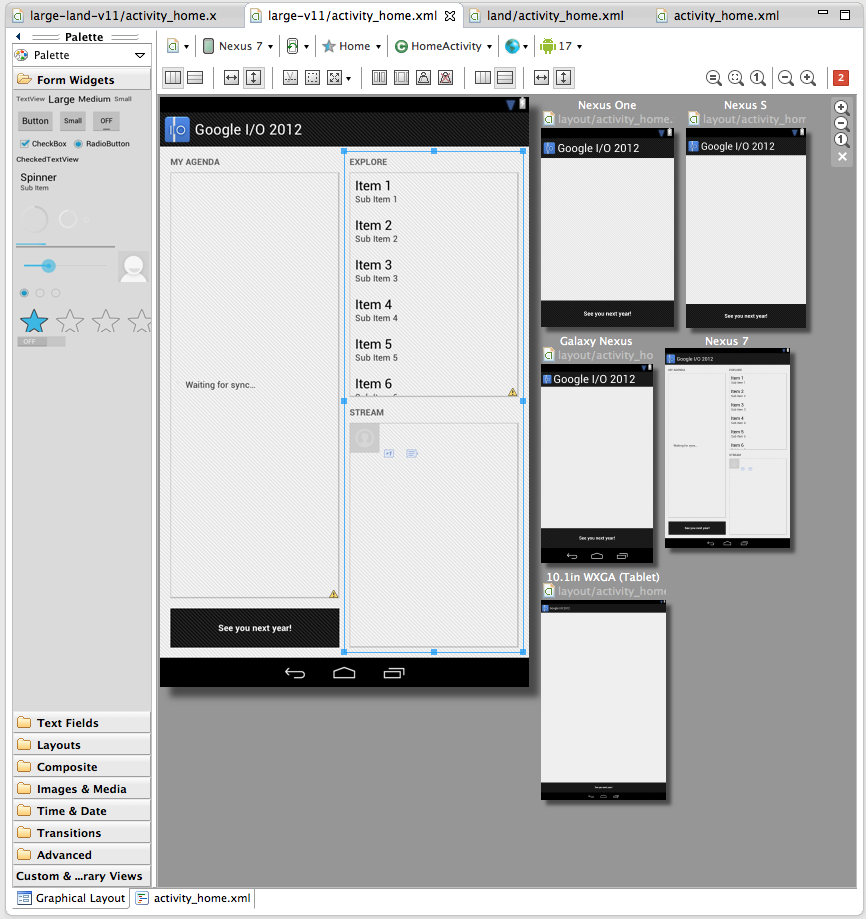
A new multi-configuration editor allows you to develop and prototype your UI across various orientations, screen sizes and locales. For example, while editing your layout in portrait mode, you can see if your edits aren't visible in the shorter landscape orientation. You can see previews for other screen sizes from small phones to large tablets, you can see previews for the layout using all the available language translations in your app, and so on. You can even see how the layout appears when it is included as a fragment in a different larger layout. Finally, Android allows you to create specialized layouts for any of these configurations, and the multi configuration editor shows you these overridden layouts.


Here is a screenshot of the layout editor showing one of the layouts from the Google I/O application, across a variety of screen sizes.


More app templates

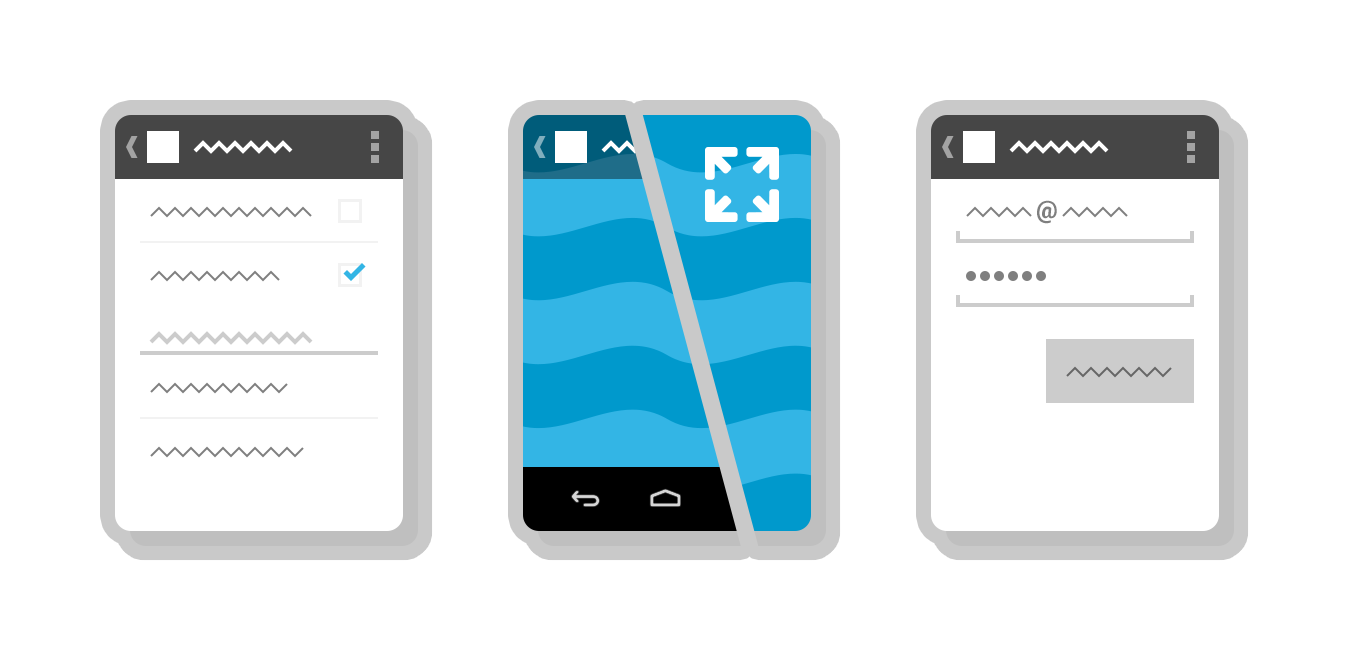
Tools R21 brings three new app templates to help you to easily add new screens to your app. There’s a new full-screen activity for use as a photo or video viewer, a settings activity to handle basic user preferences and a login activity to capture username/password.


UI Automator Test Framework

One common approach to UI testing is to run tests manually and verify that the app is behaving as expected. UI Automator is a new software testing framework available in Tools R21 that provides you with tools to easily automate UI testing tasks. It provides a GUI tool to scan and analyze the UI components of an Android application (uiautomatorviewer), a library containing APIs to create customized functional UI tests, and an execution engine to automate and run the tests against multiple physical devices. UI Automator runs on Android 4.1 (API level 16) or higher. To learn more head over to the UI Testing documentation.


One-click SDK installer

New Android SDK developers now have a convenient way to download all the various SDK components like Tools, Platform Tools, Eclipse ADT, and the latest system image with a single click. Existing developers can continue to manage their SDK components and get updates through the SDK Manager.


Revamped AVD creation dialog

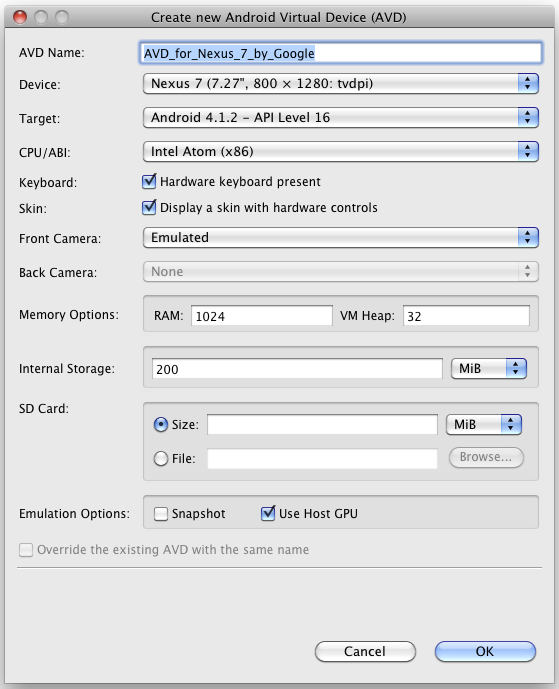
The new dialog makes it easier to create Android Virtual Devices (AVDs) matching real device profiles. The AVDs will also appear in the layout editor to show you how the layouts will look.


More Lint rules

And to wrap things up there are 25 new lint rules which catch several common sources of bugs, for example deviations from Android design guide for icons, checks for mismanaged wakelocks, common sources of locale-related bugs and so on. So make sure you upgrade and let Lint loose on your projects before your next app update!


A minor bug-fix to the Android NDK is also available. For a complete list of what’s new, see the release notes for SDK Tools R21, ADT 21.0.0 and Android NDK R8c.


Join the discussion on

+Android Developers
Email ThisBlogThis!Share to XShare to FacebookShare to Pinterest
Posted in Android SDK, Tools | No comments
Newer Post Older Post Home

0 comments:

Post a Comment

Subscribe to: Post Comments (Atom)

Popular Posts

  • Bring Your Apps into the Classroom, with Google Play for Education
    Posted by Shazia Makhdumi, Head of Strategic EDU Partnerships, Google Play team Google Play for Education has officially launched . It’s an ...
  • A Faster Emulator with Better Hardware Support
    [This post is by Xavier Ducrohet and Reto Meier of the Android engineering team. — Tim Bray.] The Android emulator is a key tool for Android...
  • Powering Chrome to Phone with Android Cloud to Device Messaging
    [This post is by Dave Burke, who's an Engineering Manager 80% of the time. — Tim Bray] Android Cloud to Device Messaging (C2DM) was lau...
  • Android 1.5 is here!
    I've got some good news today: the Android 1.5 SDK, release 1 is ready! Grab it from the download page . For an overview of the new Andr...
  • Memory Analysis for Android Applications
    [This post is by Patrick Dubroy, an Android engineer who writes about programming, usability, and interaction on his personal blog . — Tim B...
  • Preview of Google TV Add-on for the Android SDK
    [This post is by Ambarish Kenghe, who’s a Product Manager for Google TV — Tim Bray] At Google I/O , we announced that Android Market is comi...
  • Android SDK Tools, Revision 20
    [This post is by Xavier Ducrohet , Tech Lead for the Android developer tools] Along with the preview of the Android 4.1 (Jelly Bean) platfo...
  • RenderScript Intrinsics
    Posted by R. Jason Sams , Android RenderScript Tech Lead RenderScript has a very powerful ability called Intrinsics . Intrinsics are built-...
  • In-App Billing on Android Market: Ready for Testing
    [This post is by Eric Chu, Android Developer Ecosystem. —Dirk Dougherty] Back in January we announced our plan to introduce Android Market ...
  • Twitter for Android: A closer look at Android’s evolving UI patterns
    [This post is by Chris Nesladek, Interaction Designer, Richard Fulcher, Interaction Designer, and Virgil Dobjanschi, Software Engineer — Ti...

Categories

  • accessibility
  • Action Bar
  • Administration
  • Android
  • Android 1.5
  • Android 1.6
  • Android 2.0
  • Android 2.1
  • Android 2.2
  • Android 2.3
  • Android 2.3.3
  • Android 3.0
  • Android 3.2
  • Android 4.0
  • Android 4.2
  • Android 4.3
  • Android 4.4
  • Android Design
  • Android Developer Challenge
  • Android Developer Phone
  • Android Market
  • Android SDK
  • Android Studio
  • Animation and Graphics
  • Announcements
  • App Components
  • App Resources
  • Apps
  • Audio
  • Authentication
  • Best Practices
  • Boston
  • Code Day
  • Connectivity
  • Content Provider
  • Cool Stuff
  • Dashboard
  • Daydream
  • Debugging
  • Developer Console
  • Developer Days
  • Developer Labs
  • Developer profiles
  • Developer Story
  • Education
  • Games
  • GCM
  • Gestures
  • Google Analytics
  • Google Cloud Messaging
  • Google Cloud Platform
  • Google I/O
  • Google Play
  • Google Play game services
  • Google Play services
  • Google Services
  • Google Wallet
  • Google+
  • Guidelines
  • How-to
  • Image Processing
  • IME
  • In-app Billing
  • Input methods
  • Intents
  • io2010
  • IO2013
  • JNI
  • Layout
  • Localization
  • Location
  • Location and Sensors
  • London
  • Maps
  • Media and Camera
  • Mountain View
  • Munich
  • NDK
  • Open source
  • OpenGL ES
  • Optimization
  • Performance
  • Photo Sphere
  • Promo Graphics
  • Quality
  • Quick Search Box
  • Renderscript
  • Resources
  • RTL
  • Sample code
  • SDK Tools
  • SDK updates
  • Security
  • Sensors
  • Speech Input
  • Support Library
  • Survey
  • Tablets
  • Tel Aviv
  • Telephony
  • Testing
  • Text and Input
  • Text-to-Speech
  • Tools
  • Touch
  • User Interface
  • User Support
  • WebView
  • Widgets

Blog Archive

  • ►  2013 (45)
    • ►  November (2)
    • ►  October (7)
    • ►  September (2)
    • ►  August (5)
    • ►  July (5)
    • ►  June (4)
    • ►  May (9)
    • ►  April (3)
    • ►  March (2)
    • ►  February (3)
    • ►  January (3)
  • ▼  2012 (43)
    • ►  December (5)
    • ▼  November (3)
      • Designing for Tablets? We’re Here to Help!
      • Android SDK Tools, Revision 21
      • Introducing Android 4.2, A New and Improved Jelly ...
    • ►  October (3)
    • ►  September (1)
    • ►  August (1)
    • ►  July (2)
    • ►  June (5)
    • ►  May (1)
    • ►  April (5)
    • ►  March (6)
    • ►  February (5)
    • ►  January (6)
  • ►  2011 (67)
    • ►  December (7)
    • ►  November (7)
    • ►  October (5)
    • ►  September (5)
    • ►  August (3)
    • ►  July (7)
    • ►  June (3)
    • ►  May (5)
    • ►  April (6)
    • ►  March (8)
    • ►  February (7)
    • ►  January (4)
  • ►  2010 (72)
    • ►  December (8)
    • ►  November (3)
    • ►  October (4)
    • ►  September (8)
    • ►  August (6)
    • ►  July (9)
    • ►  June (11)
    • ►  May (11)
    • ►  April (2)
    • ►  March (3)
    • ►  February (2)
    • ►  January (5)
  • ►  2009 (63)
    • ►  December (7)
    • ►  November (5)
    • ►  October (5)
    • ►  September (8)
    • ►  August (2)
    • ►  July (1)
    • ►  June (2)
    • ►  May (5)
    • ►  April (12)
    • ►  March (5)
    • ►  February (8)
    • ►  January (3)
  • ►  2008 (40)
    • ►  December (3)
    • ►  November (1)
    • ►  October (4)
    • ►  September (6)
    • ►  August (4)
    • ►  June (1)
    • ►  May (5)
    • ►  April (4)
    • ►  March (5)
    • ►  February (2)
    • ►  January (5)
  • ►  2007 (8)
    • ►  December (3)
    • ►  November (5)
Powered by Blogger.

About Me

Unknown
View my complete profile